What’s New in Salesforce: Smarter Send Email Action in the Latest Release
The “Send Email Action Updates” feature in Salesforce Flow Builder introduces several enhancements to streamline and improve the email configuration process.
Key Updates:
- Organized Input Sections
- Switch Between Action Versions
- Compose or Select Email Templates
- CC and BCC Recipient Fields
- Simplified Sender and Content Inputs
- Email Logging
- Threading Tokens
- File Attachments
Benefits:
- Improved Usability: The updates make it easier to configure and manage email actions within Flow Builder.
- Enhanced Flexibility: Users can switch between action versions and choose between composing emails directly or using templates.
- Better Organization: Clearly organized input sections and new fields for CC and BCC recipients improve the overall email configuration process.
For more detailed information, you can refer to the Salesforce release notes and documentation. Link
Organized Input Sections – Link
- Recipients, Senders, and Email Content: Inputs are now clearly organized into distinct sections, making it easier to manage and customize emails.
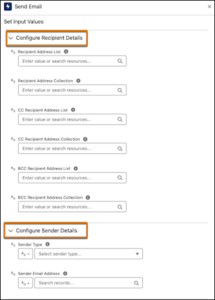
(Screenshot from Salesforce Screen)
Switch Between Action Versions – Link
2. Visibility and Organization: Users can switch between different versions of the Send Email Action to control the visibility and organization of email content configuration parameters.
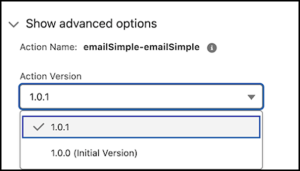
(Screenshot from Salesforce Screen)
Compose or Select Email Templates – Link
3. Direct Composition: Users can write and format email content directly within the Send Email action.
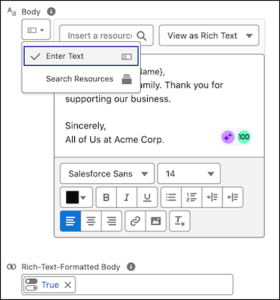
(Screenshot from Salesforce Screen)
4. Template Selection: Existing email templates can be selected by name, eliminating the need to bring the email template ID into the flow.
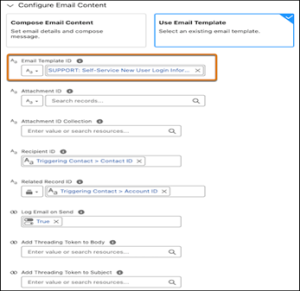
(Screenshot from Salesforce Screen)
CC and BCC Recipient Fields – Link
5. Collection Support: New fields for CC and BCC recipients allow users to add multiple addresses directly within the Send Email action.
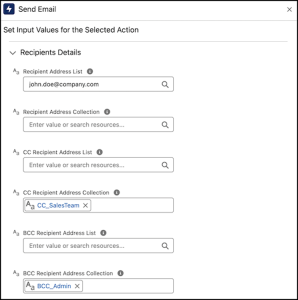
(Screenshot from Salesforce Screen)
Simplified Sender and Content Inputs – Link
6. Streamlined Configuration: Users can easily choose a sender type, enter a sender email address, select an email template, attach files, and choose a specific record.
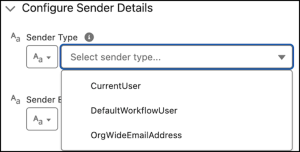
(Screenshot from Salesforce Screen)
Email Logging – Link
7. Conditional Logging: The Log Email on Send field is now hidden by default and only appears when a recipient or related record ID is provided.
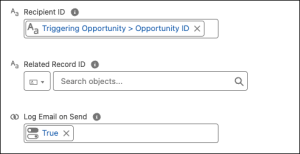
(Screenshot from Salesforce Screen)
Threading Tokens – Link
8. Conditional Addition: Threading tokens are added to the email body and subject only if a related record ID is provided.
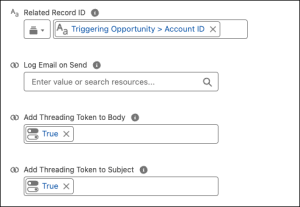
(Screenshot from Salesforce Screen)
File Attachments – Link
9. Easier Attachment: Attaching files to emails is simplified by allowing users to provide a text collection variable in the Attachment ID Collection field.
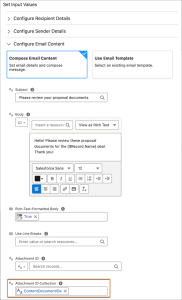
(Screenshot from Salesforce Screen)
Read More: Link
We at Si2 Technologies help you to stay updated and implement these updates in your organization. Connect with us for any of your needs regarding Salesforce!