Understanding NWDI Setup and its Role in SAP Java Transports using CM Services
1. 📘 Introduction
In SAP landscapes where Java-based applications (like SAP Portal, PI/PO, etc.) are deployed, traditional ABAP transport tools (e.g., STMS) are not applicable. Instead, SAP provides the NetWeaver Development Infrastructure (NWDI) to manage the development, versioning, and transport of Java components across system landscapes.
At the heart of NWDI is the Change Management (CM) Service, which ensures controlled and traceable movement of Java objects across development, test, and production environments.
2. 🎯 Purpose of NWDI
NWDI provides a complete Java development lifecycle framework with the following goals:
- Version control for SAP Java applications.
- Centralized build and transport management.
- Governance and transparency across the development landscape.
- Integration with SAP NetWeaver Developer Studio (NWDS) for developers.
- Transport synchronization across environments (Dev → QA → Prod).
3. 🔄 How NWDI Works – High-Level Flow?
- Development: Developers work in NWDS, connecting to NWDI, pulling SCs (Software Components) from DTR.
- Check-in: Code is versioned in DTR.
- Build: CBS compiles the code and builds Java archives.
- Transport: CM Service handles movement of compiled code through the landscape (DEV → QA → PROD).
4. 🚀 Why NWDI is Required for SAP Java Transports?
Unlike ABAP, Java objects:
- Are not stored in the database but as files in EAR/WAR formats.
- Cannot be transported using STMS or traditional transport routes.
Key Reasons NWDI is Needed:
| Reason | Explanation |
|---|---|
| ✅ Centralized Development | Ensures all developers work with the latest shared codebase. |
| ✅ Consistent Builds | All builds are done centrally by CBS, ensuring consistency. |
| ✅ Controlled Transports | CM Service ensures proper approvals, sequencing, and tracking. |
| ✅ Audit & Traceability | All actions (check-ins, builds, transports) are logged. |
| ✅ Conflict Management | Helps manage parallel developments and merging in Java components. |
Initial Setup & Configuration of CM Service
CM (Change Management) services allow transport of sources and/or deployable from source to target MII systems. Initial Setup involves setting up the services below:
- SLD
- Configuring NWDI with CM Services
- Establish connection from NWDI and CTS+ system
The transport options with granularity are as below:
Source Export: Granularity:
- Software Components
- Activities
Deployable Export: Granularity:
- Software Components
- Development Components
- Activities
Overall Architecture
Involves a separate SAP NetWeaver Java system running NWDI configuration followed by Dev, QAS, and Prod NetWeaver Java Systems (e.g., PO, MII/ME etc). Note that it is not recommended to have NWDI configured on the same Dev system.
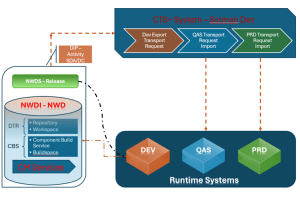
1. DTR (Design Time Repository)
What it is:
- DTR is a version control system in SAP NWDI.
- It is similar to Git or Subversion (SVN), but it’s tightly integrated with SAP tools and processes.
- It manages source code and development configurations.
Key Features:
- Maintains versions of development objects.
- Supports check-in/check-out operations.
- Allows parallel development through activities and change lists.
- Provides a WebDAV-based repository, meaning files can be accessed like a file system over the network.
How it works:
- Developers create or edit source files in NWDS (NetWeaver Developer Studio).
- These changes are checked into DTR as activities (like commits).
- Each activity can be transported through the landscape via NWDI tracks.
2. CBS (Component Build Service)
What it is:
- CBS is the build engine of NWDI.
- It compiles and builds Java components (SCs – Software Components) stored in DTR.
Key Features:
- Automatically builds changed development components when an activity is released.
- Provides build logs and status.
- Ensures build consistency by checking dependencies.
How it works:
- When a developer releases an activity in DTR, CBS picks up the change.
- CBS builds the relevant development component (DC).
- If successful, the built result is stored in the CMS for further transport.
To be continued…
Part II will contain a bit of actual setup and configuration procedure.
At Si2 Tech, we will help you Simplify Development and Amplify Innovation. Harness the power of NWDI to unify your SAP JAVA Lifecycle – making every build, deploy, and update faster, smarter, and more reliable with our help.
📩 Want to learn more or see a demo? Contact us at info@si2tech.com
Author
Tushar Pardeshi
Senior Consultant – SAP BASIS